Share Private Information Securely
Locki encrypts private information directly in your browser. Share it anywhere — only the intended recipient can read it.
AES-256-GCM
Bank-grade encryption
Zero-Knowledge
We never see your data
Local Processing
Encryption in the browser
GDPR Ready
Compliant by design
Open Audit
Transparent cryptography
Free Trial
14 days, no credit card
Sharing Sensitive Information Online Carries Real Risk
Every day, people share passwords, personal data, private conversations, and confidential details through channels that were not designed to protect them. Email, chat apps, and web forms transmit data in ways that create unnecessary exposure.
Email providers scan messages for spam and advertising. Messages are stored on servers indefinitely and can be accessed in a breach or by legal request.
Slack, WhatsApp Web, and Telegram store your messages. Breaches, admin access, and retention policies all create exposure over time.
A Google Drive or Dropbox link shared once can be forwarded, indexed, or accessed long after you intended the sharing to end.
Once sensitive information is sent in plaintext, you can't undo it. Encryption before sending is the only way to ensure the content can't be used if intercepted.
Encrypt First, Share Through Any Channel
Encrypt private information in your browser before it reaches any server, app, or network. The channel you use becomes irrelevant.
Only people who have the same Locki key can decrypt the content. Without the key, the ciphertext is unreadable to anyone.
Encrypted text is just text — paste it in email, chat, a document, or a form. It works everywhere.
Revealed content hides automatically after a short period. Even if someone looks over the recipient's shoulder, the window is brief.
Share private information in four steps
Share your key securely (once)
Share your Locki key with the intended recipient via a secure channel — Signal, in person, or through Locki's admin dashboard for teams.
Encrypt the information
Select the private information, right-click, and encrypt it with Locki. It becomes an encrypted string in seconds.
Share through any channel
Send the encrypted string via email, Slack, WhatsApp Web, or paste it anywhere. The channel's security no longer matters.
Recipient decrypts privately
The recipient sees [lockied], clicks it, and Locki decrypts the content in their browser — privately, without it reaching any server.
What people share securely with Locki
Share a password with a colleague or family member through any channel — encrypted, so only they can read it.
Account numbers, ID details, and financial data can be shared encrypted rather than in plain text email or chat.
Keep personal or confidential conversations private even when the messaging platform isn't end-to-end encrypted.
One-time codes, temporary credentials, and time-sensitive information can be shared encrypted and then rendered inaccessible by key rotation.
Encrypt sensitive sections of documents before sharing a link — so the link itself doesn't expose the confidential content.
Share sensitive health or legal details through email or web tools without relying on the platform to keep them private.
AES-256-GCM
Bank-grade encryption standard
Zero-Knowledge
Locki never sees your content
For Individuals & Teams
Solo or shared key usage
Your data stays in your browser
Locki uses AES-256-GCM encryption that runs entirely in your browser. The key never leaves your device. Locki's servers never see your plaintext. What you encrypt is readable only by someone with your key — not by us, not by the platform, not by anyone else.
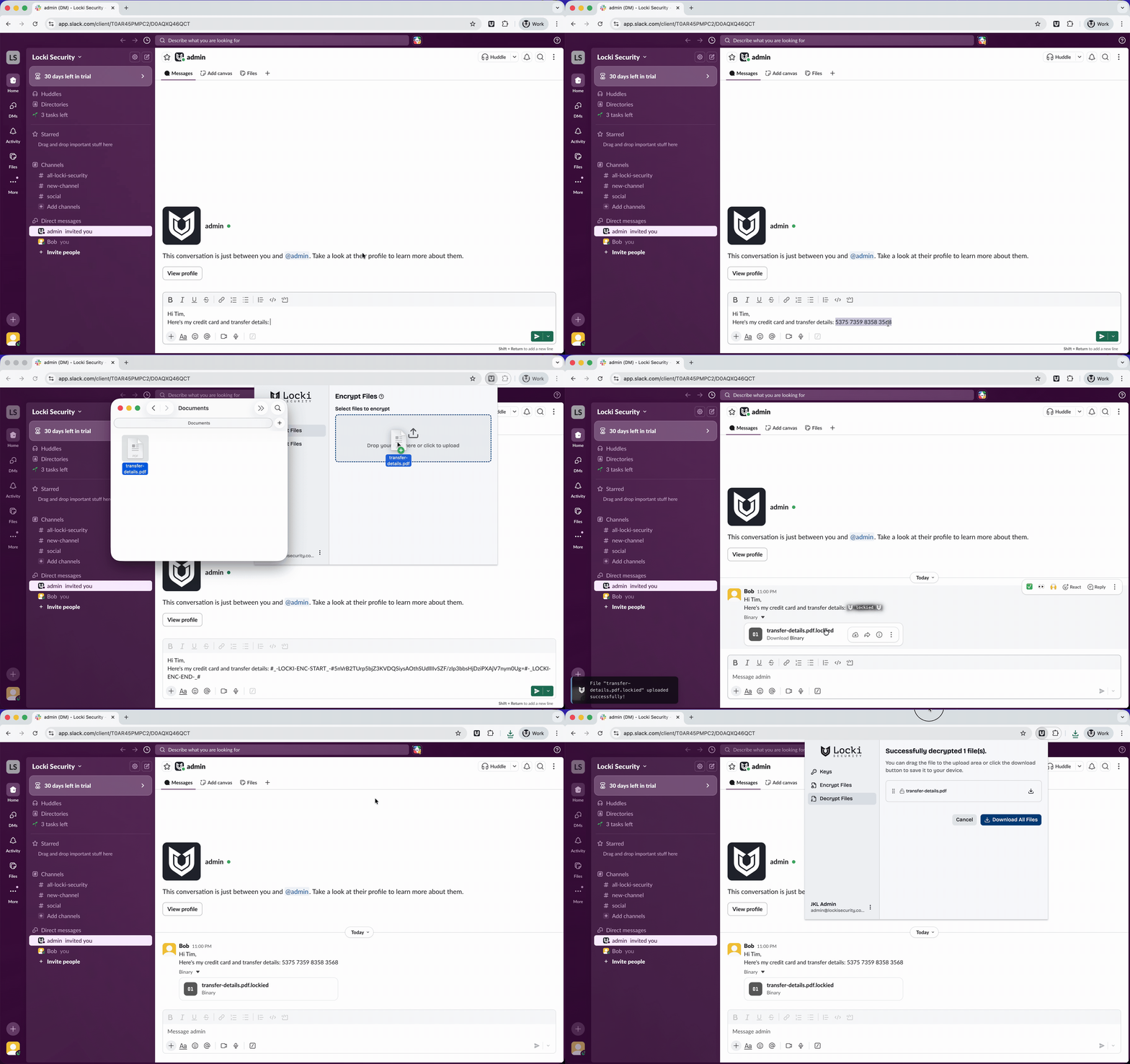
Locki in action — encrypting a message in Slack