Protect Sensitive Text Anywhere You Type
Locki encrypts any text you select — passwords, notes, personal data — before it ever leaves your browser.
AES-256-GCM
Bank-grade encryption
Zero-Knowledge
We never see your data
Local Processing
Encryption in the browser
GDPR Ready
Compliant by design
Open Audit
Transparent cryptography
Free Trial
14 days, no credit card
Sensitive Text Gets Exposed in Ways You Don't Expect
Passwords shared in chats. Personal notes stored in web apps. Drafts that auto-save to the cloud. Sensitive text is exposed at every step of a normal digital workflow — usually without the user realizing it.
Teams regularly share passwords in Slack, email, or notes. These platforms store everything unencrypted and readable by admins.
Notes apps, documents, and drafts are synced to cloud servers. A breach of the cloud provider exposes your content.
Draft emails and documents auto-save to servers before you've even decided to share them. That data is accessible to the provider.
Forms collect data before submission. Trackers, injected scripts, and browser extensions can read that text as you type it.
One Click to Protect Any Text in Any Field
Select the sensitive text in any field and encrypt it with Locki before saving or submitting. Only the encrypted version is stored.
Inputs, textareas, rich-text editors, note apps — Locki works in any browser-based text field.
Each encryption uses a unique random key parameter. Even encrypting the same text twice produces different output.
Encrypted text stays as ciphertext until you click it. Locki reveals it for a short period, then automatically hides it again.
Protect any text in seconds
Type or paste your sensitive text
Enter any sensitive content — a password, personal data, or confidential note — in any web field.
Select and encrypt it
Highlight the text, right-click, and choose "Encrypt with Locki". The text is replaced with encrypted ciphertext immediately.
Store or share the encrypted version
Save the document, submit the form, or share the text. Only the encrypted version is stored or transmitted.
Decrypt when needed
Click the [lockied] placeholder anytime to reveal the original text for a short period. It hides automatically after that.
What people protect with Locki
Encrypt passwords before sharing them in Slack, email, or any collaboration tool. Even if the message is leaked, the password stays safe.
Keep private notes encrypted in Notion, Obsidian Web, or Google Docs. Only you — and people with your key — can read them.
Encrypt sensitive sections of in-progress documents before they're auto-saved to the cloud. Protect the content at the source.
Encrypt API keys, tokens, and access credentials before pasting them into tickets, wikis, or chat messages.
Protect ID numbers, account details, and financial information before entering them in web forms or sharing them online.
Encrypt the parts of a conversation that need to stay between specific people — regardless of which platform you use.
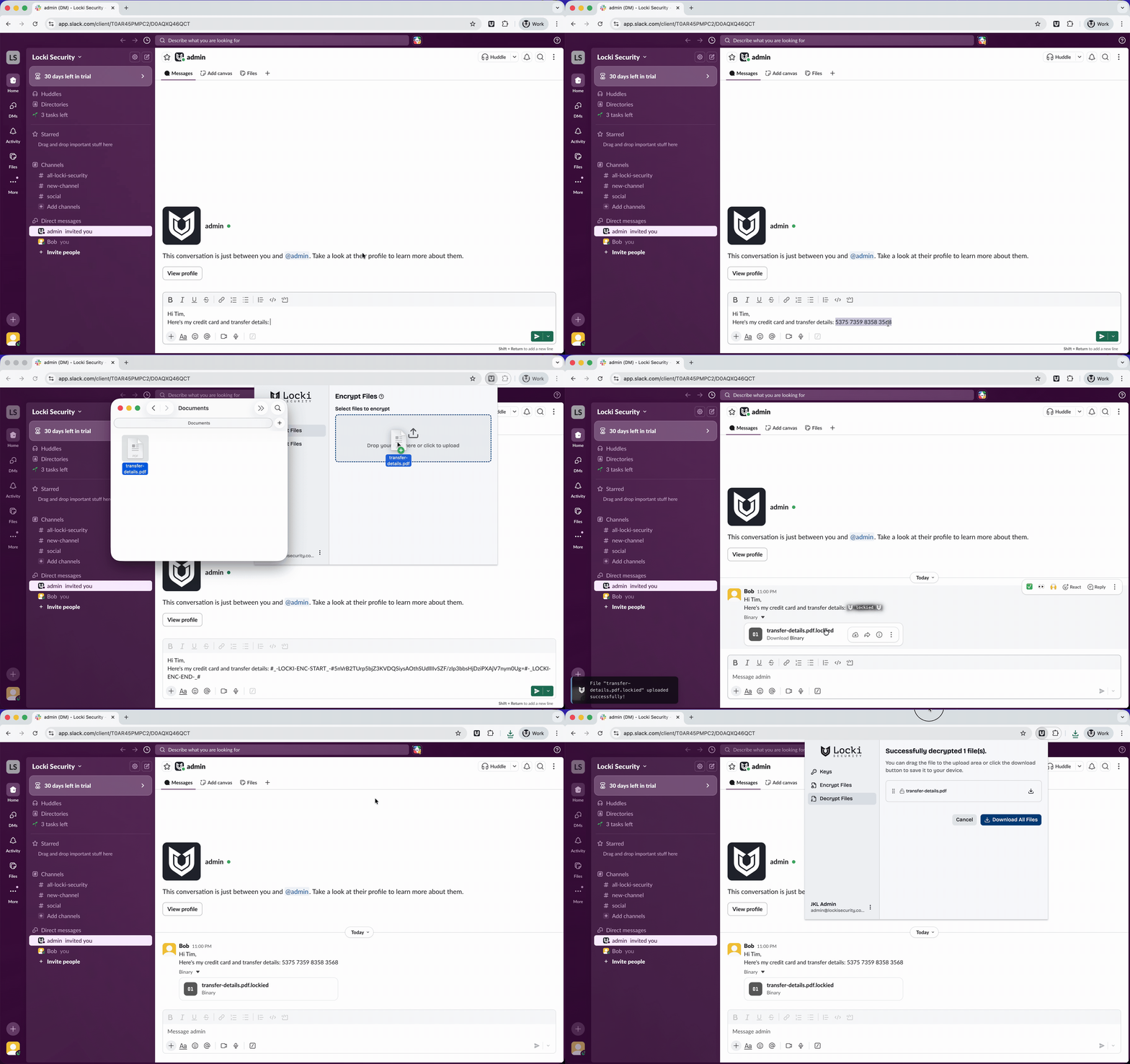
Locki in action — encrypting a message in Slack
Client-side encryption — your data never leaves your browser
Locki uses AES-256-GCM with a unique IV per operation. All encryption runs in your browser using the Web Crypto API. Your key never leaves your device, and Locki's servers never see your plaintext. See our full security architecture for technical details.