Encrypt Messages Online Before You Send Them
Locki encrypts your text directly in the browser. No one else can read it — not the platform, not us.
AES-256-GCM
Bank-grade encryption
Zero-Knowledge
We never see your data
Local Processing
Encryption in the browser
GDPR Ready
Compliant by design
Open Audit
Transparent cryptography
Free Trial
14 days, no credit card
Every Message You Send Could Be Exposed
Most messaging platforms store your messages in plaintext. That means anyone with server access — or anyone who intercepts the message in transit — can read what you wrote. Encryption before sending is the only reliable way to fix this.
Slack, Gmail, and most messaging tools store messages in plaintext on their servers. Admins, data breaches, or legal requests can expose them.
Sensitive text copied between apps can be intercepted by clipboard sniffers or accidentally pasted into the wrong window.
Some browser extensions and plugins have access to what you type in web pages. Without encryption, your message is visible to anything with page access.
Misdirected messages happen. With encryption, the wrong recipient sees only unreadable ciphertext — your information stays safe.
Encrypt Before You Send — Right in the Browser
Text is encrypted inside your browser field before it reaches any server. The platform only ever sees ciphertext.
Locki works inside Slack, Gmail, Jira, Notion, WhatsApp Web, and any other browser-based messaging tool.
Encryption happens locally using your browser's native cryptography. Locki's servers never receive your plaintext — ever.
Select text, right-click, encrypt. No technical knowledge required. Works for the whole team in under a minute.
Encrypt a message in four steps
Write your message
Type your message as normal in any web app — Slack, Gmail, or any browser-based tool.
Select and encrypt
Highlight the text, right-click, and choose "Encrypt with Locki". It becomes an encrypted string instantly.
Send through any channel
Send the message as usual. The encrypted text is safe to send anywhere — even over unsecured channels.
Recipient decrypts with one click
The recipient sees [lockied] badge. They click it and Locki decrypts it in their browser. No one else can read it.
Encrypt messages in any web-based app
Protect confidential messages in Slack channels, DMs, Google Chats, etc. Even workspace admins see only ciphertext.
Encrypt sensitive email body text before sending. Works in Gmail, Outlook Web, and any browser-based email client.
Encrypt sensitive data before submitting through support tickets, contact forms, or feedback tools.
Encrypt sensitive information before sending through any web-based messaging interface.
Protect sensitive issue descriptions, comments, and credentials in project management platforms.
Encrypt sensitive sections in Notion, Confluence, or Google Docs that collaborators without the key cannot read.
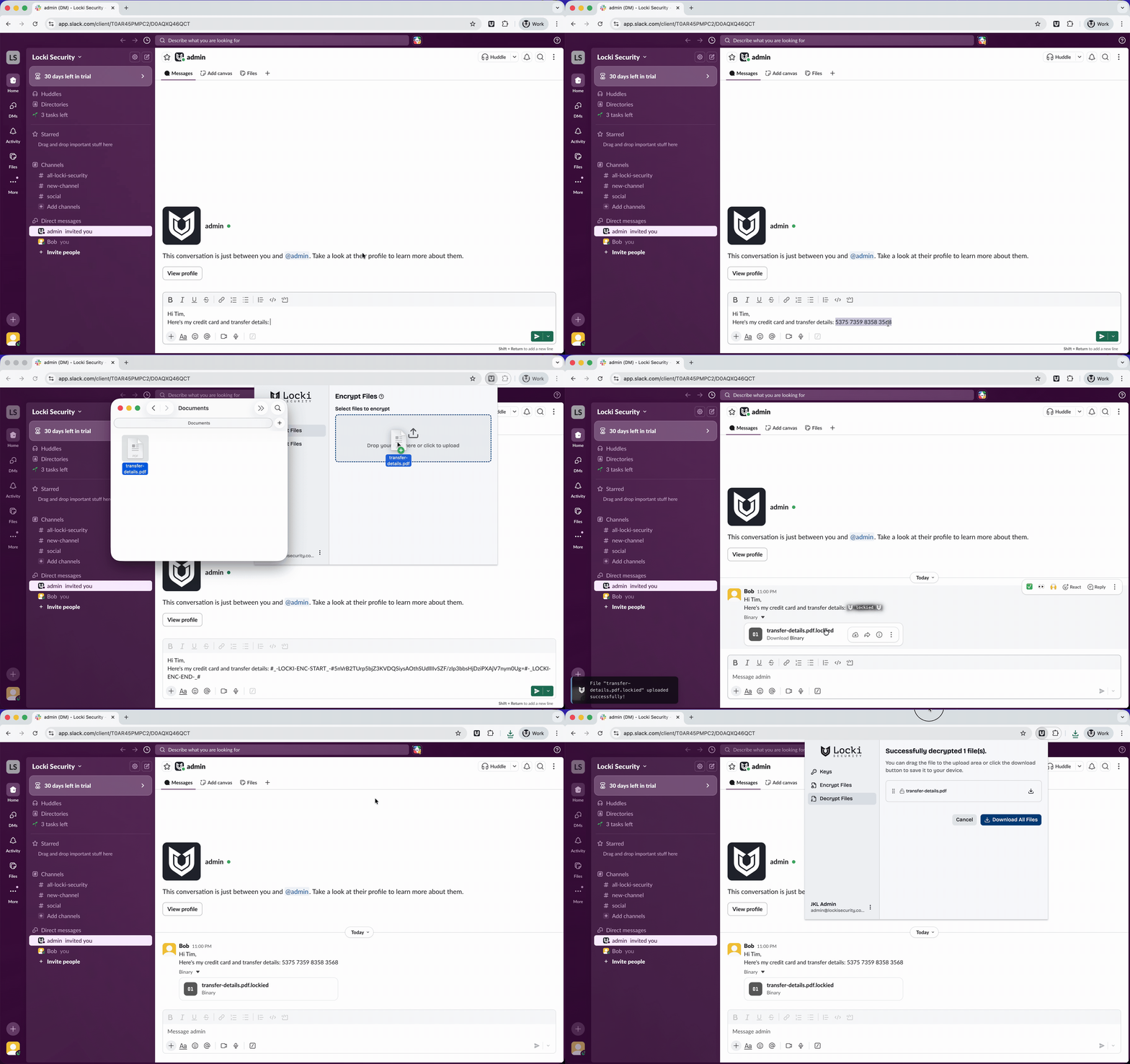
Locki in action — encrypting a message in Slack
How the encryption works
Locki uses AES-256-GCM — the standard trusted by banks and governments. Encryption runs entirely in your browser using the native Web Crypto API. Your key never leaves your device. Locki's servers never see your plaintext or your key.