Encrypt Files Before You Upload or Share Them
Locki encrypts files directly in your browser — before they leave your device. Upload to Google Drive, send via email, or share a link: only someone with your key can read the contents.
AES-256-GCM
Bank-grade encryption
Zero-Knowledge
We never see your data
Local Processing
Encryption in the browser
GDPR Ready
Compliant by design
Open Audit
Transparent cryptography
Free Trial
14 days, no credit card
Files you share are rarely private
When you upload a file to the cloud or attach it to an email, you're trusting every server it passes through. Most platforms can read what you upload — and so can anyone who gains access.
Google Drive, Dropbox, and OneDrive store files in a way that the provider can access. Encryption at rest protects against hardware theft — not against the provider or a data breach.
Attaching a file to an email means it passes through multiple mail servers in plaintext. Anyone intercepting the message or with access to a mail server can read it.
Sharing a file via link on Google Drive or Dropbox gives anyone with that link full read access. If the link leaks, so does the file — with no way to limit who can open it.
Files downloaded from external parties may be modified in transit. Without encryption and integrity verification, you can't confirm the file you received is the file that was sent.
Encrypt the file before it ever leaves your browser
Locki uses the Web Crypto API to apply AES-256-GCM encryption directly in your browser tab.
The encrypted file is a standard binary blob. Upload it anywhere — Google Drive, Dropbox, Slack, email. The platform stores ciphertext it cannot read.
Locki's servers never see the file. Encryption and decryption both happen locally — your data never travels to us.
Anyone with Locki and the correct key can decrypt the file on their device.
Encrypt a file in four steps
Select your file
Open Locki, choose a file from your device. Locki reads it locally — nothing is uploaded to a server.
Locki encrypts it locally
AES-256-GCM runs in your browser using your active key. The output is an encrypted binary that cannot be opened without the key.
Download the encrypted file
Download the encrypted file to your device. Upload it to any cloud storage, send it via email, or share it however you like.
Recipient decrypts with the key
The recipient decrypts the file in Locki using the same key it was encrypted with. Decryption happens locally on their device.
Who uses Locki for file encryption
Encrypt legal documents before sharing them via email or a shared drive link. The recipient gets the file; only the intended party can open it.
Store encrypted files in Google Drive, Dropbox, or iCloud. Even if someone gains access to your storage, they see only ciphertext.
Attach an encrypted file to any email client. The attachment is safe in transit — no S/MIME setup, no PGP keys to manage.
Encrypt .env files, SSH keys, or API credential files before committing or sharing them. Decrypt locally before use.
Send salary sheets, performance reviews, or personal employee records via standard tools without exposing the contents to IT admins or mail servers.
Encrypt personal photos and media before uploading to cloud backup. Your files stay backed up and private — even from the cloud provider.
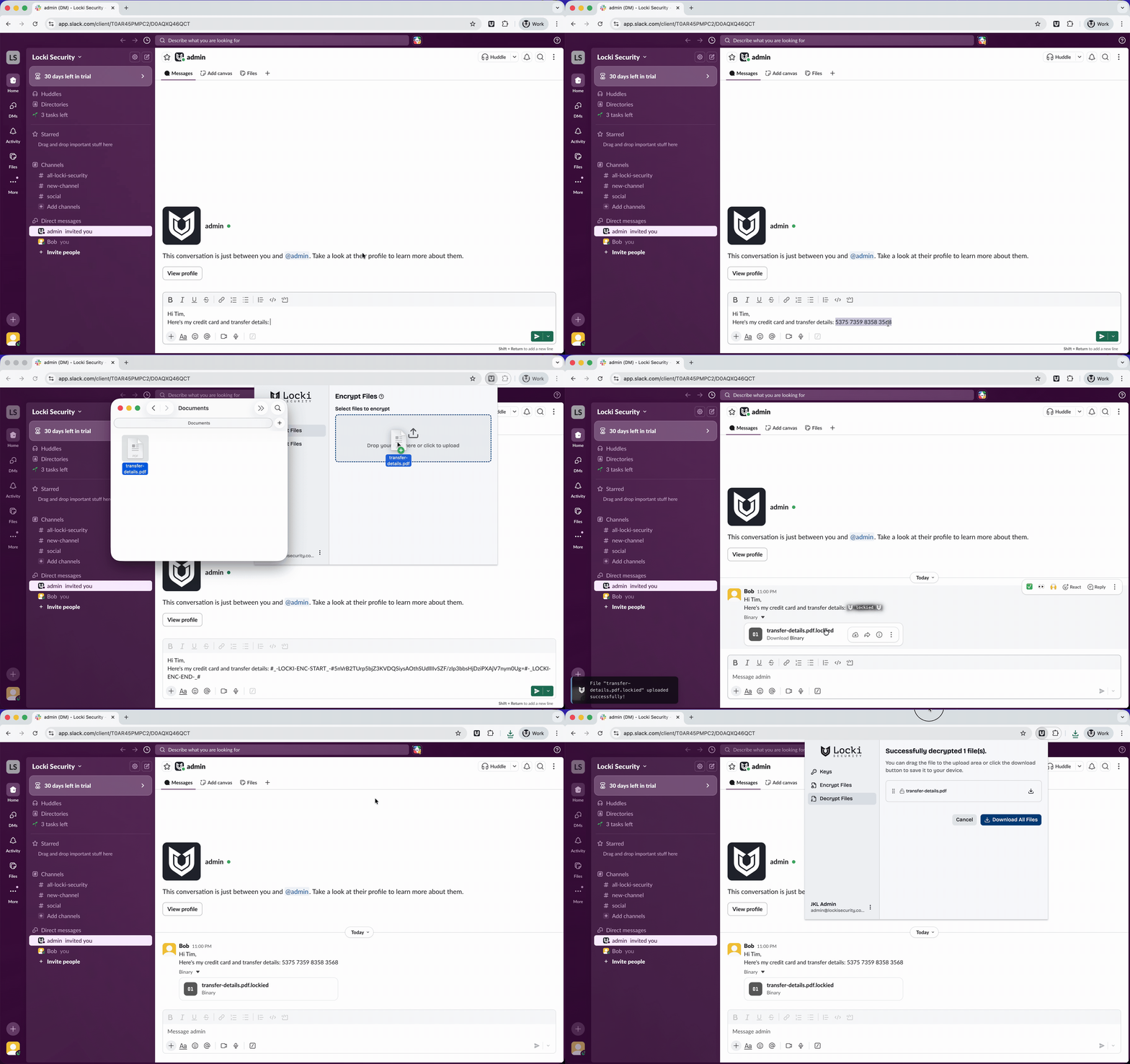
Locki in action — encrypting a message in Slack
Encryption that runs entirely in your browser
Locki uses the Web Crypto API with AES-256-GCM — the same standard used by governments and financial institutions. Files are encrypted before they leave your browser tab. Your key never reaches our servers. We never see the file contents. Decryption happens locally too, so the plaintext file is never transmitted.