Secure Your Business Communication in Seconds
Locki encrypts sensitive messages and documents directly inside the tools your team already uses — no workflow changes, no new apps.
AES-256-GCM
Bank-grade encryption
Zero-Knowledge
We never see your data
Local Processing
Encryption in the browser
GDPR Ready
Compliant by design
Open Audit
Transparent cryptography
Free Trial
14 days, no credit card
Business Communication Is a Frequent Source of Data Leaks
Teams share credentials, client data, contracts, and internal strategies over Slack, email, and project tools every day. These platforms are convenient — but they weren't designed to keep sensitive content confidential at the message level.
Database passwords, API keys, and service credentials routinely get shared in chat messages. Even internal Slack channels are accessible to workspace admins and Slack's own support team.
Jira tickets, Notion pages, and Confluence articles often contain sensitive client details. Any breach of these platforms exposes that data directly.
Shared Google Docs and wikis can be accidentally made public, or accessed by people who have left the organization but still have a link.
When employees leave, credentials they saw in plaintext remain a risk. Encrypted messages and rotated keys ensure ex-employees can't access what they once could.
Enterprise Encryption That Works Inside Your Existing Tools
Locki runs inside Slack, Gmail, Jira, Notion, Confluence, Google Docs, and any other browser-based app — no integrations required.
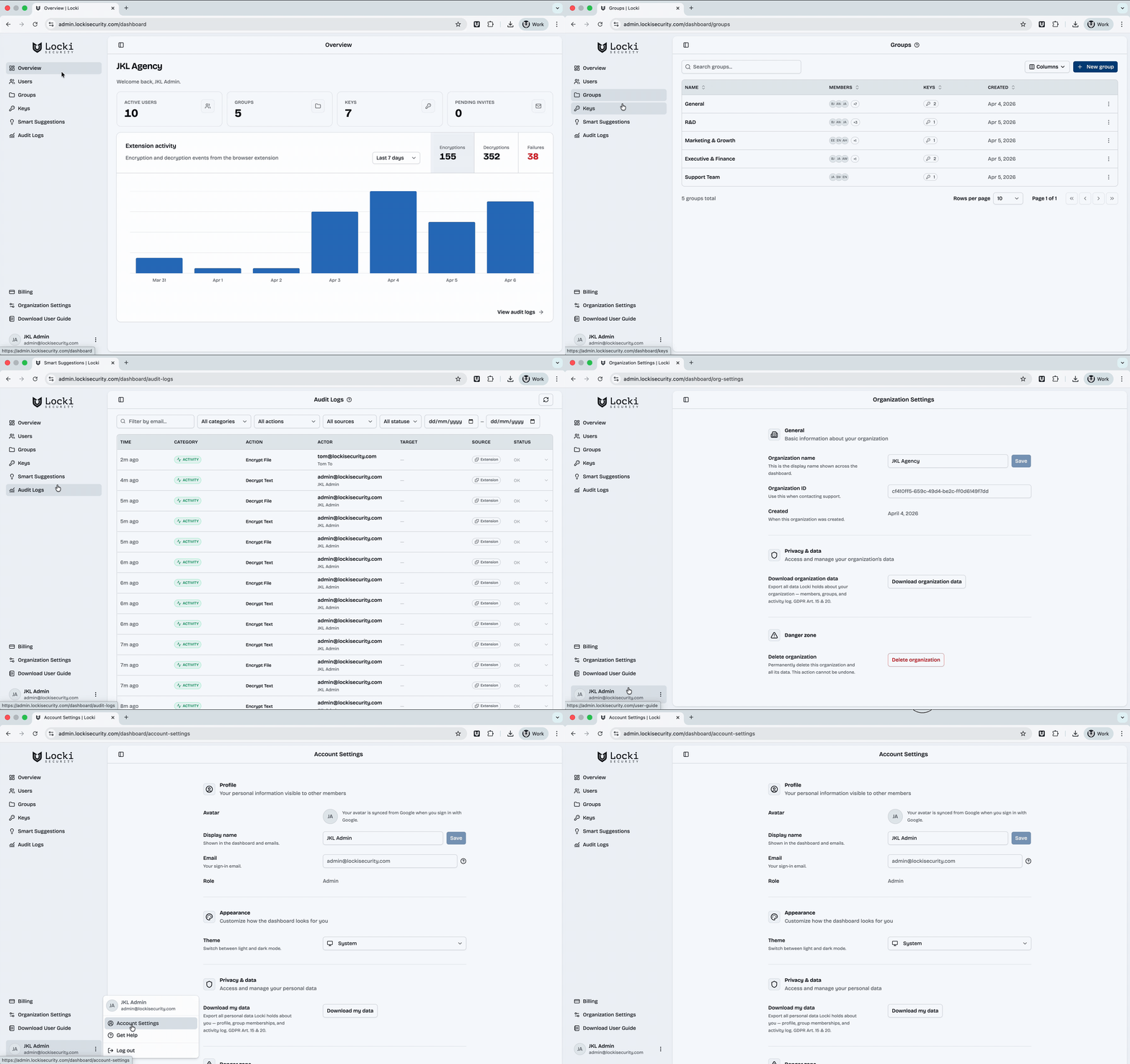
Admins create keys in the dashboard and assign them to groups. Team members get the right keys automatically when they sign in — no manual key sharing.
Every encryption and decryption is logged with actor, timestamp, and platform. Your organization gets visibility without seeing content.
Rotate keys when team members leave. New keys sync to active members automatically. Old access is revoked without manual credential resets.
Set up team encryption in four steps
Admin creates keys in the dashboard
The org admin creates AES-256 encryption keys in the Locki admin dashboard and assigns them to team groups.
Team members install the extension
Each team member installs Locki for Chrome, Safari, or Edge. Keys sync automatically on sign-in.
Encrypt sensitive content
Anyone on the team can select text in any web app, right-click, and encrypt it in one action.
Share through any channel
Encrypted text can be shared via any channel. Only team members with the right key can decrypt it.
What teams protect with Locki
Encrypt sensitive Slack or Teams messages — credentials, strategic discussions, HR topics — so only the intended recipients can read them.
Share encrypted client data, account details, or confidential proposals through email or project tools without exposing the content to the platform.
Encrypt API keys, database passwords, and environment configs in Jira, GitHub, and Slack before sharing them with the team.
Encrypt confidential sections of Confluence articles, Notion pages, and Google Docs so only authorized readers can view the protected content.
Protect salary data, performance notes, and financial figures shared in email or collaboration tools. Keep sensitive HR content accessible only to those who need it.
Legal, healthcare, and financial teams use Locki to protect regulated data in day-to-day communication while maintaining a full audit trail.
Admin Dashboard Included
Create and manage encryption keys, assign them to groups, view audit logs, and control team access — all from one central dashboard.
Zero-knowledge encryption built for teams
Locki uses AES-256-GCM with client-side encryption. Your plaintext never leaves the browser. The admin dashboard provides full audit visibility into who encrypted what and when — without ever accessing the content itself.